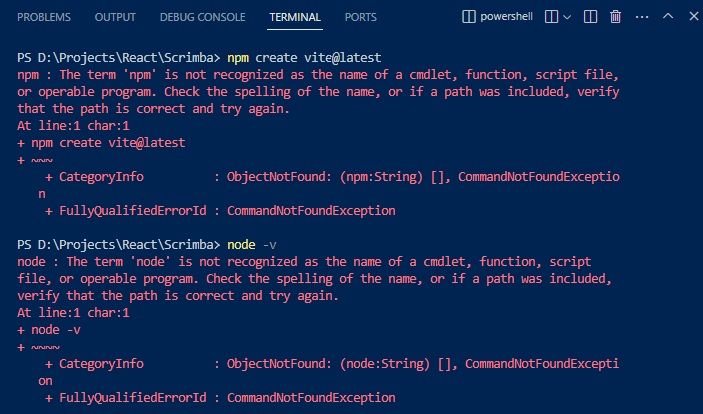
یکی از خطاهایی که ممکن است پیش از استفاده از دستورات npm دریافت کنید ارور زیر است. من ارور زیر را پس از نوشتن دستور مشاهده نسخه نود دریافت میکنم node -v:
node : The term 'node' is not recognized as the name of a cmdlet, function, script file, or operable program. Check the spelling of the name, or if a path was included, verify that the path is correct and try again. At line:1 char:1 + node v + ~~~~ + CategoryInfo : ObjectNotFound: (node:String) [], CommandNotFoundException + FullyQualifiedErrorId : CommandNotFoundException
و هنگامی که دستور npm create vite@latest را مینویسم خطای زیر را دریافت میکنم:
npm : The term 'npm' is not recognized as the name of a cmdlet, function, script file,
or operable program. Check the spelling of the name, or if a path was included, verify
that the path is correct and try again.
At line:1 char:1
+ npm create vite@latest
+ ~~~
    + CategoryInfo          : ObjectNotFound: (npm:String) [], CommandNotFoundException
    + FullyQualifiedErrorId : CommandNotFoundException
د رهر دو دستور بالا خطا میگوید node و npm را به عنوان دستور، تابع، فایل اسکریپتی یا عملگر برنامه نمیشناسد.
مشکل در اینجاست که شما می بایست برنامه ادیتور کد مثل ویژوال استودیو را ببندید و دوباره باز کنید. به همین سادگی تا هم بتوانید شماره نسخه نود جی اس را مشاهده کنید و هم از دستورات پکیج منیجر نود استفاده کنید.
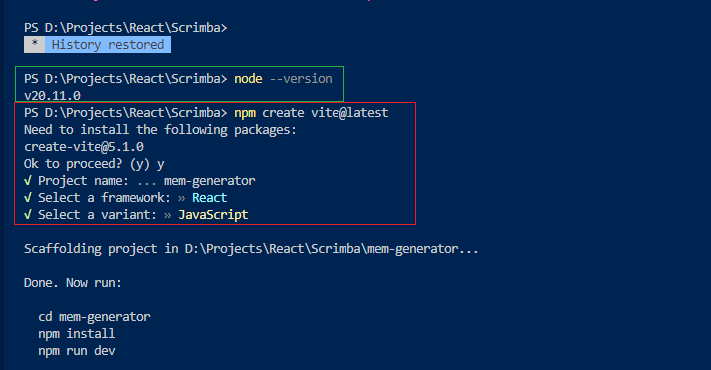
پس از بستن برنامه ویژوال استودیو و باز کردن آن و نوشتن دستورات بالا، دیگر خطایی دریافت نمیکنیم. به تصویر زیر نگاه کنید: