به نام خدا
سلام
توی این جلسه میخوایم یک نوتپد بسازیم:
import tkinter
import os
from tkinter import *
from tkinter.messagebox import *
from tkinter.filedialog import *
class Notepad:
__root = Tk()
# default window width and height
__thisWidth = 300
__thisHeight = 300
__thisTextArea = Text(__root)
__thisMenuBar = Menu(__root)
__thisFileMenu = Menu(__thisMenuBar, tearoff=0)
__thisEditMenu = Menu(__thisMenuBar, tearoff=0)
__thisHelpMenu = Menu(__thisMenuBar, tearoff=0)
# To add scrollbar
__thisScrollBar = Scrollbar(__thisTextArea)
__file = None
def __init__(self,**kwargs):
# Set icon
try:
self.__root.wm_iconbitmap("Notepad.ico")
except:
pass
# Set window size (the default is 300x300)
try:
self.__thisWidth = kwargs['width']
except KeyError:
pass
try:
self.__thisHeight = kwargs['height']
except KeyError:
pass
# Set the window text
self.__root.title("Untitled - Notepad")
# Center the window
screenWidth = self.__root.winfo_screenwidth()
screenHeight = self.__root.winfo_screenheight()
# For left-align
left = (screenWidth / 2) - (self.__thisWidth / 2)
# For right-align
top = (screenHeight / 2) - (self.__thisHeight /2)
# For top and bottom
self.__root.geometry('%dx%d+%d+%d' % (self.__thisWidth,
self.__thisHeight,
left, top))
# To make the textarea auto resizable
self.__root.grid_rowconfigure(0, weight=1)
self.__root.grid_columnconfigure(0, weight=1)
# Add controls (widget)
self.__thisTextArea.grid(sticky = N + E + S + W)
# To open new file
self.__thisFileMenu.add_command(label="New",
command=self.__newFile)
# To open a already existing file
self.__thisFileMenu.add_command(label="Open",
command=self.__openFile)
# To save current file
self.__thisFileMenu.add_command(label="Save",
command=self.__saveFile)
# To create a line in the dialog
self.__thisFileMenu.add_separator()
self.__thisFileMenu.add_command(label="Exit",
command=self.__quitApplication)
self.__thisMenuBar.add_cascade(label="File",
menu=self.__thisFileMenu)
# To give a feature of cut
self.__thisEditMenu.add_command(label="Cut",
command=self.__cut)
# to give a feature of copy
self.__thisEditMenu.add_command(label="Copy",
command=self.__copy)
# To give a feature of paste
self.__thisEditMenu.add_command(label="Paste",
command=self.__paste)
# To give a feature of editing
self.__thisMenuBar.add_cascade(label="Edit",
menu=self.__thisEditMenu)
# To create a feature of description of the notepad
self.__thisHelpMenu.add_command(label="About Notepad",
command=self.__showAbout)
self.__thisMenuBar.add_cascade(label="Help",
menu=self.__thisHelpMenu)
self.__root.config(menu=self.__thisMenuBar)
self.__thisScrollBar.pack(side=RIGHT,fill=Y)
# Scrollbar will adjust automatically according to the content
self.__thisScrollBar.config(command=self.__thisTextArea.yview)
self.__thisTextArea.config(yscrollcommand=self.__thisScrollBar.set)
def __quitApplication(self):
self.__root.destroy()
# exit()
def __showAbout(self):
showinfo("Notepad","notepad")
def __openFile(self):
self.__file = askopenfilename(defaultextension=".txt",
filetypes=[("All Files","*.*"),
("Text Documents","*.txt")])
if self.__file == "":
# no file to open
self.__file = None
else:
# Try to open the file
# set the window title
self.__root.title(os.path.basename(self.__file) + " - Notepad")
self.__thisTextArea.delete(1.0,END)
file = open(self.__file,"r")
self.__thisTextArea.insert(1.0,file.read())
file.close()
def __newFile(self):
self.__root.title("Untitled - Notepad")
self.__file = None
self.__thisTextArea.delete(1.0,END)
def __saveFile(self):
if self.__file == None:
# Save as new file
self.__file = asksaveasfilename(initialfile='Untitled.txt',
defaultextension=".txt",
filetypes=[("All Files","*.*"),
("Text Documents","*.txt")])
if self.__file == "":
self.__file = None
else:
# Try to save the file
file = open(self.__file,"o")
file.write(self.__thisTextArea.get(1.0,END))
file.close()
# Change the window title
self.__root.title(os.path.basename(self.__file) + " - Notepad")
else:
file = open(self.__file,"w")
file.write(self.__thisTextArea.get(1.0,END))
file.close()
def __cut(self):
self.__thisTextArea.event_generate("<<Cut>>")
def __copy(self):
self.__thisTextArea.event_generate("<<Copy>>")
def __paste(self):
self.__thisTextArea.event_generate("<<Paste>>")
def run(self):
# Run main application
		self.__root.mainloop()
# Run main application
notepad = Notepad(width=700,height=500)
notepad.run()
import tkinter
import os
from tkinter import *
from tkinter.messagebox import *
from tkinter.filedialog import *
class Notepad:
__root = Tk()
# default window width and height
__thisWidth = 300
__thisHeight = 300
__thisTextArea = Text(__root)
__thisMenuBar = Menu(__root)
__thisFileMenu = Menu(__thisMenuBar, tearoff=0)
__thisEditMenu = Menu(__thisMenuBar, tearoff=0)
__thisHelpMenu = Menu(__thisMenuBar, tearoff=0)
# To add scrollbar
__thisScrollBar = Scrollbar(__thisTextArea)
__file = None
def __init__(self,**kwargs):
# Set icon
try:
self.__root.wm_iconbitmap("Notepad.ico")
except:
pass
# Set window size (the default is 300x300)
try:
self.__thisWidth = kwargs['width']
except KeyError:
pass
try:
self.__thisHeight = kwargs['height']
except KeyError:
pass
# Set the window text
self.__root.title("Untitled - Notepad")
# Center the window
screenWidth = self.__root.winfo_screenwidth()
screenHeight = self.__root.winfo_screenheight()
# For left-align
left = (screenWidth / 2) - (self.__thisWidth / 2)
# For right-align
top = (screenHeight / 2) - (self.__thisHeight /2)
# For top and bottom
self.__root.geometry('%dx%d+%d+%d' % (self.__thisWidth,
self.__thisHeight,
left, top))
# To make the textarea auto resizable
self.__root.grid_rowconfigure(0, weight=1)
self.__root.grid_columnconfigure(0, weight=1)
# Add controls (widget)
self.__thisTextArea.grid(sticky = N + E + S + W)
# To open new file
self.__thisFileMenu.add_command(label="New",
command=self.__newFile)
# To open a already existing file
self.__thisFileMenu.add_command(label="Open",
command=self.__openFile)
# To save current file
self.__thisFileMenu.add_command(label="Save",
command=self.__saveFile)
# To create a line in the dialog
self.__thisFileMenu.add_separator()
self.__thisFileMenu.add_command(label="Exit",
command=self.__quitApplication)
self.__thisMenuBar.add_cascade(label="File",
menu=self.__thisFileMenu)
# To give a feature of cut
self.__thisEditMenu.add_command(label="Cut",
command=self.__cut)
# to give a feature of copy
self.__thisEditMenu.add_command(label="Copy",
command=self.__copy)
# To give a feature of paste
self.__thisEditMenu.add_command(label="Paste",
command=self.__paste)
# To give a feature of editing
self.__thisMenuBar.add_cascade(label="Edit",
menu=self.__thisEditMenu)
# To create a feature of description of the notepad
self.__thisHelpMenu.add_command(label="About Notepad",
command=self.__showAbout)
self.__thisMenuBar.add_cascade(label="Help",
menu=self.__thisHelpMenu)
self.__root.config(menu=self.__thisMenuBar)
self.__thisScrollBar.pack(side=RIGHT,fill=Y)
# Scrollbar will adjust automatically according to the content
self.__thisScrollBar.config(command=self.__thisTextArea.yview)
self.__thisTextArea.config(yscrollcommand=self.__thisScrollBar.set)
def __quitApplication(self):
self.__root.destroy()
# exit()
def __showAbout(self):
showinfo("Notepad","notepad")
def __openFile(self):
self.__file = askopenfilename(defaultextension=".txt",
filetypes=[("All Files","*.*"),
("Text Documents","*.txt")])
if self.__file == "":
# no file to open
self.__file = None
else:
# Try to open the file
# set the window title
self.__root.title(os.path.basename(self.__file) + " - Notepad")
self.__thisTextArea.delete(1.0,END)
file = open(self.__file,"r")
self.__thisTextArea.insert(1.0,file.read())
file.close()
def __newFile(self):
self.__root.title("Untitled - Notepad")
self.__file = None
self.__thisTextArea.delete(1.0,END)
def __saveFile(self):
if self.__file == None:
# Save as new file
self.__file = asksaveasfilename(initialfile='Untitled.txt',
defaultextension=".txt",
filetypes=[("All Files","*.*"),
("Text Documents","*.txt")])
if self.__file == "":
self.__file = None
else:
# Try to save the file
file = open(self.__file,"o")
file.write(self.__thisTextArea.get(1.0,END))
file.close()
# Change the window title
self.__root.title(os.path.basename(self.__file) + " - Notepad")
else:
file = open(self.__file,"w")
file.write(self.__thisTextArea.get(1.0,END))
file.close()
def __cut(self):
self.__thisTextArea.event_generate("<<Cut>>")
def __copy(self):
self.__thisTextArea.event_generate("<<Copy>>")
def __paste(self):
self.__thisTextArea.event_generate("<<Paste>>")
def run(self):
# Run main application
self.__root.mainloop()
# Run main application
notepad = Notepad(width=700,height=500)
notepad.run()
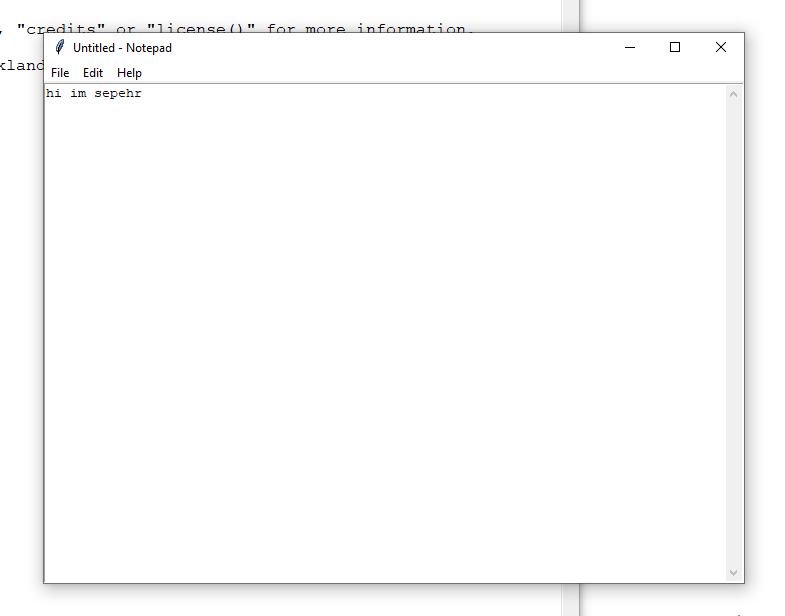
اگر از این آموزش خوشتون اومد من رو حمایت کنید
تا جلسه ی بعدی خدانگهدار