

بعد از چند وقت تصمیم گرفتم که یک سری مقاله برای تکمیل کردن دوره توسعه اپلیکیشن های مدرن اندرویدی منتشر کنم. در دوره قبلی به علت کمبود وقت، Dagger 2 رو آموزش ندادم و به جای اون از KOIN استفاده کردم؛ اما چند وقت پیش با شنیدن ارائه Dagger Hilt این فکر به سرم زد که بیام و ی مقاله پروژه محور(سورس کد بعد از دوره در گیتهاب قرار خواهد گرفت) راجبش منتشر کنم. با ی سرچ ساده ی آموزش ساده از MindOrks پیدا کردم که خیلی ساده آموزشو پیش برده که برای این سری مقاله اکثر قسمتاشو مثل اون پیش میریم!
قسمت ها:
برای اینکه اپلیکیشن تقریبا واقعی به نظر بیاد، به یک Web API نیاز داریم. با ی سرچ ساده، دو API برای یکی از سریال های محبوبم Game of thrones پیاده کردم?:
شروع به ساخت یک اپلیکیشن در اندروید استدیو کردم و اسم پروژه رو Ice and Fire گذاشتم.
ساختار پوشه بندی اصلی:
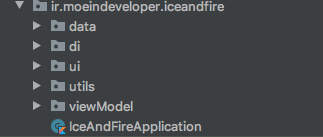
کتابخانه های اضافه شده:
implementation 'androidx.constraintlayout:constraintlayout:2.0.0-rc1'
برای استفاده از Motion layout از ورژن ۲ کانسترینت لایوت استفاده می کنم.
کتاب خانه های جت پک
//android Arch components: implementation "androidx.concurrent:concurrent-futures-ktx:1.1.0-rc01" def lifecycle_version = "2.2.0" def arch_version = "2.1.0" // ViewModel implementation "androidx.lifecycle:lifecycle-viewmodel-ktx:$lifecycle_version" // LiveData implementation "androidx.lifecycle:lifecycle-livedata-ktx:$lifecycle_version" // Annotation processor kapt "androidx.lifecycle:lifecycle-compiler:$lifecycle_version" def nav_version = "2.3.0" //navigation implementation "androidx.navigation:navigation-fragment-ktx:$nav_version" implementation "androidx.navigation:navigation-ui-ktx:$nav_version"
رتروفیت:
//retrofit
implementation 'com.squareup.retrofit2:retrofit:2.9.0'
implementation 'com.squareup.retrofit2:converter-gson:2.9.0'
دگر هیلت و ماژول لایف سایکل ( برای ویومدل):
//dagger hilt
implementation 'com.google.dagger:hilt-android:2.28-alpha'
kapt 'com.google.dagger:hilt-android-compiler:2.28-alpha'
//android lifecycle
implementation 'androidx.hilt:hilt-lifecycle-viewmodel:1.0.0-alpha02'
kapt 'androidx.hilt:hilt-compiler:1.0.0-alpha02'
در فایل Build.gradle ماژول پروژه و در قسمت Dependencies:
classpath 'com.google.dagger:hilt-android-gradle-plugin:2.28-alpha'
و در قسمت repositories :
repositories {
 google()
 jcenter()
 mavenCentral()
}
و در فایل Build.gradle ماژول اپ:
apply plugin: 'kotlin-kapt'
apply plugin: 'dagger.hilt.android.plugin'
پس از انجام این مراحل، گریدل خود را Sync کنید!
برای شروع،دو کلاس برای برای اعلام وضعیت بین لایه نتورک و یو ای میسازیم و اسم اونو Resource و RequestStatus میذاریم:
enum class RequestStatus {
 SUCCESS,
    ERROR,
    LOADING
}
data class Resource<out T>(val status: RequestStatus, val data: T?, val Message: String?) {

 companion object {
 fun <T> success(data: T?): Resource<T> {
 return Resource(RequestStatus.SUCCESS,data,null)
  }

 fun <T> error(msg: String, data: T?): Resource<T> {
 return Resource(RequestStatus.ERROR,data,msg)
  }

 fun <T> loading(data: T?): Resource<T> {
 return Resource(RequestStatus.LOADING,data,null)
  }
 }

}
سپس طبق مستندات API بالا، دیتاکلاس های نتورک رو میسازیم:
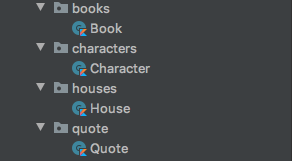
data class Book( @SerializedName("authors") val authors: List<String>, @SerializedName("characters") val characters: List<String>, @SerializedName("country") val country: String, @SerializedName("isbn") val isbn: String, @SerializedName("mediaType") val mediaType: String, @SerializedName("name") val name: String, @SerializedName("numberOfPages") val numberOfPages: Int, @SerializedName("povCharacters") val povCharacters: List<String>, @SerializedName("publisher") val publisher: String, @SerializedName("released") val released: String, @SerializedName("url") val url: String )
data class Character( @SerializedName("aliases") val aliases: List<String>, @SerializedName("allegiances") val allegiances: List<Any>, @SerializedName("books") val books: List<String>, @SerializedName("born") val born: String, @SerializedName("culture") val culture: String, @SerializedName("died") val died: String, @SerializedName("father") val father: String, @SerializedName("mother") val mother: String, @SerializedName("name") val name: String, @SerializedName("playedBy") val playedBy: List<String>, @SerializedName("povBooks") val povBooks: List<String>, @SerializedName("spouse") val spouse: String, @SerializedName("titles") val titles: List<String>, @SerializedName("tvSeries") val tvSeries: List<String>, @SerializedName("url") val url: String )
data class House( @SerializedName("ancestralWeapons") val ancestralWeapons: List<String>, @SerializedName("cadetBranches") val cadetBranches: List<String>, @SerializedName("coatOfArms") val coatOfArms: String, @SerializedName("currentLord") val currentLord: String, @SerializedName("diedOut") val diedOut: String, @SerializedName("founded") val founded: String, @SerializedName("founder") val founder: String, @SerializedName("heir") val heir: String, @SerializedName("name") val name: String, @SerializedName("overlord") val overlord: String, @SerializedName("region") val region: String, @SerializedName("seats") val seats: List<String>, @SerializedName("swornMembers") val swornMembers: List<String>, @SerializedName("titles") val titles: List<String>, @SerializedName("url") val url: String, @SerializedName("words") val words: String )
data class Quote( @SerializedName("character") val character: String, @SerializedName("quote") val quote: String )
حالا نوبت میرسه به ساخت interface ها:
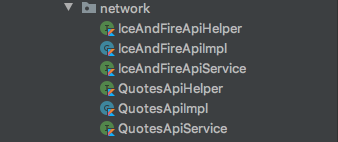
interface IceAndFireApiHelper {


 suspend fun getBooks(): Response<List<Book>>

 suspend fun getBook(
 bookID: Int
 ): Response<Book>


 suspend fun getCharacters(): Response<List<Character>>


 suspend fun filterCharacters(
 name: String?,
        gender: String?,
        culture: String?,
        isAlive: Boolean?
 ): Response<List<Character>>

 suspend fun getCharacter(characterID: Int): Response<Character>

 suspend fun getHouses(): Response<List<House>>

 suspend fun getHouse(houseID: Int): Response<House>
}
 class IceAndFireApiImpl(private val service: IceAndFireApiService) : IceAndFireApiHelper {

 override suspend fun getBooks(): Response<List<Book>> = service.getBooks()

 override suspend fun getBook(bookID: Int): Response<Book> = service.getBook(bookID)

 override suspend fun getCharacters(): Response<List<Character>> = service.getCharacters()

 override suspend fun filterCharacters(
 name: String?,
        gender: String?,
        culture: String?,
        isAlive: Boolean?
 ): Response<List<Character>> = service.filterCharacters(name,gender,culture,isAlive)

 override suspend fun getCharacter(characterID: Int): Response<Character> = service.getCharacter(characterID)

 override suspend fun getHouses(): Response<List<House>> = service.getHouses()

 override suspend fun getHouse(houseID: Int): Response<House> = service.getHouse(houseID)

}
interface IceAndFireApiService { @GET("api/books") suspend fun getBooks(): Response<List<Book>> @GET("api/books/{id}") suspend fun getBook( @Path("id") bookID: Int ): Response<Book> @GET("api/characters") suspend fun getCharacters(): Response<List<Character>> @GET("api/characters") suspend fun filterCharacters( @Query("name") name: String?, @Query("gender") gender: String?, @Query("culture") culture: String?, @Query("isAlive") isAlive: Boolean? ): Response<List<Character>> @GET("api/characters/{id}") suspend fun getCharacter(@Path("id") characterID: Int): Response<Character> @GET("api/houses") suspend fun getHouses(): Response<List<House>> @GET("api/houses/{id}") suspend fun getHouse(@Path("id") houseID: Int): Response<House> }
 interface QuotesApiHelper {

 suspend fun getQuotes(): Response<Quote>

 suspend fun filterQuotes(
 character: String
 ): Response<Quote>
}
class QuotesApiImpl(private val service: QuotesApiService): QuotesApiHelper {

 override suspend fun getQuotes(): Response<Quote> = service.getQuotes()

 override suspend fun filterQuotes(character: String): Response<Quote> = service.filterQuotes(character)

}
interface QuotesApiService { @GET("quotes") suspend fun getQuotes(): Response<Quote> @GET("quotes") suspend fun filterQuotes( @Query("char") character: String ): Response<Quote> }
برای استفاده از coroutines از suspend fun استفاده میکنیم، و حتما در نظر داشته باشید که از ورژن 2.6+ رتروفیت استفاده کنید که کروتینز رو پشتیبانی کنه!
خب برای این قسمت فک کنم تا اینجا کافی باشه! در قسمت بعدی مفاهیم دگر رو به صورت کلی بررسی خواهیم کرد و پروژه رو با دگر کانفیگ میکنیم!


