مقدمه
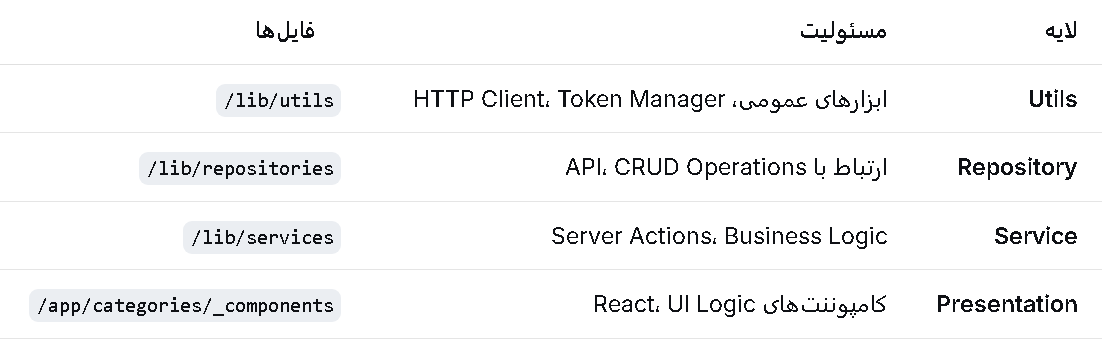
ساختار پروژه
لایه Utils
لایه Repository
لایه Services (Server Actions)
کامپوننتهای مستقل
جمعبندی
در این نسخه، کدها را به صورت لایهای و کاملاً جدا از هم سازماندهی میکنیم تا خوانایی، قابلیت نگهداری و تست پذیری افزایش یابد.
text
┌─────────────────────────────────────────────┐ │ Presentation Layer │ │ (React Components) │ └──────────────────┬──────────────────────────┘ │ ┌──────────────────▼──────────────────────────┐ │ Service Layer │ │ (Server Actions) │ └──────────────────┬──────────────────────────┘ │ ┌──────────────────▼──────────────────────────┐ │ Repository Layer │ │ (API Communication) │ └──────────────────┬──────────────────────────┘ │ ┌──────────────────▼──────────────────────────┐ │ Utils Layer │ │ (HTTP Client, Helpers) │ └─────────────────────────────────────────────┘
text
app/
├── categories/
│   ├── page.tsx                         # صفحه اصلی
│   └── _components/
│       ├── CategoryList.tsx
│       ├── CategoryCreateForm.tsx
│       ├── CategoryEditForm.tsx
│       └── CategoryDeleteButton.tsx
├── lib/
│   ├── utils/
│   │   ├── http-client.ts               # کلاینت HTTP
│   │   └── token-manager.ts             # مدیریت توکن
│   ├── repositories/
│   │   └── category.repository.ts       # Repository دستهبندی
│   └── services/
│       └── category.service.ts          # Server Actions
└── types/
    └── category.ts                      # Types
typescript
// lib/utils/token-manager.ts
import { cookies } from 'next/headers';

export class TokenManager {
  static async getAccessToken(): Promise<string | undefined> {
    const cookieStore = cookies();
    return cookieStore.get('access_token')?.value;
  }

  static async getRefreshToken(): Promise<string | undefined> {
    const cookieStore = cookies();
    return cookieStore.get('refresh_token')?.value;
  }

  static async getHeaders(): Promise<HeadersInit> {
    const token = await this.getAccessToken();

    return {
      'Content-Type': 'application/json',
      ...(token && { Authorization: `Bearer ${token}` }),
    };
  }
}
typescript
// lib/utils/http-client.ts
import { TokenManager } from './token-manager';

export interface HttpClientOptions extends RequestInit {
  baseURL?: string;
}

export interface ApiResponse<T = any> {
  success: boolean;
  data?: T;
  message?: string;
  errors?: Record<string, string[]>;
  statusCode?: number;
}

export class HttpClient {
  private baseURL: string;

  constructor(baseURL?: string) {
    this.baseURL = baseURL || process.env.API_BASE_URL || 'http://localhost:8000/api';
  }

  private async request<T>(
    endpoint: string,
    options: HttpClientOptions = {}
  ): Promise<ApiResponse<T>> {
    const url = `${this.baseURL}${endpoint}`;
    const headers = await TokenManager.getHeaders();

    try {
      const response = await fetch(url, {
        ...options,
        headers: {
          ...headers,
          ...options.headers,
        },
      });

      const data = await response.json();

      if (!response.ok) {
        return {
          success: false,
          message: data.message || 'An error occurred',
          errors: data.errors,
          statusCode: response.status,
        };
      }

      return {
        success: true,
        data: data.data || data,
        message: data.message,
        statusCode: response.status,
      };
    } catch (error) {
      return {
        success: false,
        message: error instanceof Error ? error.message : 'Network error',
      };
    }
  }

  // ============ HTTP Methods ============
  async get<T>(endpoint: string, options?: HttpClientOptions): Promise<ApiResponse<T>> {
    return this.request<T>(endpoint, { ...options, method: 'GET' });
  }

  async post<T>(endpoint: string, data?: any, options?: HttpClientOptions): Promise<ApiResponse<T>> {
    return this.request<T>(endpoint, {
      ...options,
      method: 'POST',
      body: data ? JSON.stringify(data) : undefined,
    });
  }

  async put<T>(endpoint: string, data?: any, options?: HttpClientOptions): Promise<ApiResponse<T>> {
    return this.request<T>(endpoint, {
      ...options,
      method: 'PUT',
      body: data ? JSON.stringify(data) : undefined,
    });
  }

  async patch<T>(endpoint: string, data?: any, options?: HttpClientOptions): Promise<ApiResponse<T>> {
    return this.request<T>(endpoint, {
      ...options,
      method: 'PATCH',
      body: data ? JSON.stringify(data) : undefined,
    });
  }

  async delete<T>(endpoint: string, options?: HttpClientOptions): Promise<ApiResponse<T>> {
    return this.request<T>(endpoint, { ...options, method: 'DELETE' });
  }
}

// ============ Singleton Instance ============
let httpClientInstance: HttpClient | null = null;

export function getHttpClient(): HttpClient {
  if (!httpClientInstance) {
    httpClientInstance = new HttpClient();
  }
  return httpClientInstance;
}
typescript
// lib/repositories/category.repository.ts
import { getHttpClient } from '../utils/http-client';
import type {
  Category,
  CreateCategoryDto,
  UpdateCategoryDto,
  ApiResponse
} from '@/types/category';

export class CategoryRepository {
  private readonly endpoint = '/categories';

  // ============ CRUD Operations ============

  async getAll(): Promise<ApiResponse<Category[]>> {
    const http = getHttpClient();
    return http.get<Category[]>(this.endpoint);
  }

  async getById(id: string): Promise<ApiResponse<Category>> {
    const http = getHttpClient();
    return http.get<Category>(`${this.endpoint}/${id}`);
  }

  async create(data: CreateCategoryDto): Promise<ApiResponse<Category>> {
    const http = getHttpClient();
    return http.post<Category>(this.endpoint, data);
  }

  async update(id: string, data: UpdateCategoryDto): Promise<ApiResponse<Category>> {
    const http = getHttpClient();
    return http.put<Category>(`${this.endpoint}/${id}`, data);
  }

  async delete(id: string): Promise<ApiResponse<void>> {
    const http = getHttpClient();
    return http.delete<void>(`${this.endpoint}/${id}`);
  }

  // ============ Additional Methods ============

  async getBySlug(slug: string): Promise<ApiResponse<Category>> {
    const http = getHttpClient();
    return http.get<Category>(`${this.endpoint}/slug/${slug}`);
  }

  async search(query: string): Promise<ApiResponse<Category[]>> {
    const http = getHttpClient();
    return http.get<Category[]>(`${this.endpoint}/search?q=${encodeURIComponent(query)}`);
  }
}

// ============ Singleton Instance ============
let categoryRepositoryInstance: CategoryRepository | null = null;

export function getCategoryRepository(): CategoryRepository {
  if (!categoryRepositoryInstance) {
    categoryRepositoryInstance = new CategoryRepository();
  }
  return categoryRepositoryInstance;
}
typescript
// lib/services/category.service.ts
'use server';

import { revalidateTag } from 'next/cache';
import { getCategoryRepository } from '../repositories/category.repository';
import type {
  Category,
  CreateCategoryDto,
  UpdateCategoryDto,
  FormState
} from '@/types/category';

// ============ Query Services ============

export async function getCategories(): Promise<FormState<Category[]>> {
  'use server';

  try {
    const repository = getCategoryRepository();
    const result = await repository.getAll();

    if (!result.success) {
      return {
        success: false,
        message: result.message,
        errors: result.errors,
      };
    }

    return {
      success: true,
      data: result.data || [],
    };
  } catch (error) {
    return {
      success: false,
      message: 'Failed to fetch categories',
    };
  }
}

export async function getCategoryById(id: string): Promise<FormState<Category>> {
  'use server';

  try {
    const repository = getCategoryRepository();
    const result = await repository.getById(id);

    if (!result.success) {
      return {
        success: false,
        message: result.message,
        errors: result.errors,
      };
    }

    return {
      success: true,
      data: result.data,
    };
  } catch (error) {
    return {
      success: false,
      message: 'Failed to fetch category',
    };
  }
}

// ============ Mutation Services ============

export async function createCategory(
  prevState: FormState,
  formData: FormData
): Promise<FormState<Category>> {
  'use server';

  // Extract data
  const data: CreateCategoryDto = {
    name: formData.get('name') as string,
    description: formData.get('description') as string,
  };

  // Client-side validation (optional)
  if (!data.name?.trim()) {
    return {
      success: false,
      errors: { name: ['Name is required'] },
    };
  }

  try {
    const repository = getCategoryRepository();
    const result = await repository.create(data);

    if (!result.success) {
      return {
        success: false,
        message: result.message,
        errors: result.errors,
      };
    }

    // Revalidate cache
    revalidateTag('categories');
    if (result.data) {
      revalidateTag(`category_${result.data.id}`);
    }

    return {
      success: true,
      data: result.data,
      message: 'Category created successfully',
    };
  } catch (error) {
    return {
      success: false,
      message: 'Failed to create category',
    };
  }
}

export async function updateCategory(
  id: string,
  prevState: FormState,
  formData: FormData
): Promise<FormState<Category>> {
  'use server';

  // Extract data
  const data: UpdateCategoryDto = {
    id,
    name: formData.get('name') as string,
    description: formData.get('description') as string,
  };

  try {
    const repository = getCategoryRepository();
    const result = await repository.update(id, data);

    if (!result.success) {
      return {
        success: false,
        message: result.message,
        errors: result.errors,
      };
    }

    // Revalidate cache
    revalidateTag('categories');
    revalidateTag(`category_${id}`);

    return {
      success: true,
      data: result.data,
      message: 'Category updated successfully',
    };
  } catch (error) {
    return {
      success: false,
      message: 'Failed to update category',
    };
  }
}

export async function deleteCategory(
  id: string,
  prevState: FormState
): Promise<FormState> {
  'use server';

  try {
    const repository = getCategoryRepository();
    const result = await repository.delete(id);

    if (!result.success) {
      return {
        success: false,
        message: result.message,
      };
    }

    // Revalidate cache
    revalidateTag('categories');
    revalidateTag(`category_${id}`);

    return {
      success: true,
      message: 'Category deleted successfully',
    };
  } catch (error) {
    return {
      success: false,
      message: 'Failed to delete category',
    };
  }
}

// ============ Bulk Operations ============

export async function deleteMultipleCategories(
  ids: string[]
): Promise<FormState> {
  'use server';

  try {
    const repository = getCategoryRepository();
    const results = await Promise.all(
      ids.map(id => repository.delete(id))
    );

    const allSuccess = results.every(r => r.success);

    if (!allSuccess) {
      return {
        success: false,
        message: 'Failed to delete some categories',
      };
    }

    revalidateTag('categories');
    ids.forEach(id => revalidateTag(`category_${id}`));

    return {
      success: true,
      message: 'Categories deleted successfully',
    };
  } catch (error) {
    return {
      success: false,
      message: 'Failed to delete categories',
    };
  }
}
tsx
// app/categories/_components/CategoryCreateForm.tsx
'use client';

import { useActionState, useEffect, useRef } from 'react';
import { useRouter } from 'next/navigation';
import { createCategory } from '@/lib/services/category.service';
import type { FormState } from '@/types/category';

interface CategoryCreateFormProps {
  onSuccess?: () => void;
  ?: () => void;
}

export function CategoryCreateForm({ onSuccess,  }: CategoryCreateFormProps) {
  const router = useRouter();
  const formRef = useRef<HTMLFormElement>(null);

  const [state, formAction, isPending] = useActionState(
    createCategory,
    {} as FormState
  );

  useEffect(() => {
    if (state.success) {
      formRef.current?.reset();
      onSuccess?.();
      router.refresh();
    }
  }, [state.success, onSuccess, router]);

  return (
    <form ref={formRef} action={formAction} className="space-y-4">
      {state.message && !state.success && (
        <div className="p-3 bg-red-50 border border-red-200 rounded text-red-700 text-sm">
          {state.message}
        </div>
      )}

      {state.success && (
        <div className="p-3 bg-green-50 border border-green-200 rounded text-green-700 text-sm">
          {state.message}
        </div>
      )}

      <div>
        <label htmlFor="create-name" className="block text-sm font-medium text-gray-700">
          Name <span className="text-red-500">*</span>
        </label>
        <input
          type="text"
          id="create-name"
          name="name"
          className="mt-1 block w-full px-3 py-2 border border-gray-300 rounded-md shadow-sm focus:outline-none focus:ring-blue-500 focus:border-blue-500"
          placeholder="Enter category name"
          disabled={isPending}
        />
        {state.errors?.name && (
          <p className="mt-1 text-sm text-red-600">
            {state.errors.name.join(', ')}
          </p>
        )}
      </div>

      <div>
        <label htmlFor="create-description" className="block text-sm font-medium text-gray-700">
          Description
        </label>
        <textarea
          id="create-description"
          name="description"
          rows={3}
          className="mt-1 block w-full px-3 py-2 border border-gray-300 rounded-md shadow-sm focus:outline-none focus:ring-blue-500 focus:border-blue-500"
          placeholder="Enter category description"
          disabled={isPending}
        />
        {state.errors?.description && (
          <p className="mt-1 text-sm text-red-600">
            {state.errors.description.join(', ')}
          </p>
        )}
      </div>

      <div className="flex gap-3 pt-2">
        <button
          type="submit"
          disabled={isPending}
          className="flex-1 px-4 py-2 bg-blue-600 text-white rounded-md hover:bg-blue-700 focus:outline-none focus:ring-2 focus:ring-blue-500 focus:ring-offset-2 disabled:opacity-50 disabled:cursor-not-allowed transition-colors"
        >
          {isPending ? (
            <>
              <span className="inline-block animate-spin mr-2">⏳</span>
              Creating...
            </>
          ) : (
            'Create Category'
          )}
        </button>

        { && (
          <button
            type="button"
            ={}
            disabled={isPending}
            className="px-4 py-2 bg-gray-200 text-gray-700 rounded-md hover:bg-gray-300 focus:outline-none focus:ring-2 focus:ring-gray-500 focus:ring-offset-2 disabled:opacity-50 transition-colors"
          >
            Cancel
          </button>
        )}
      </div>
    </form>
  );
}
tsx
// app/categories/_components/CategoryEditForm.tsx
'use client';

import { useActionState, useEffect } from 'react';
import { useRouter } from 'next/navigation';
import { updateCategory } from '@/lib/services/category.service';
import type { Category, FormState } from '@/types/category';

interface CategoryEditFormProps {
  category: Category;
  onSuccess?: () => void;
}

export function CategoryEditForm({ category, onSuccess }: CategoryEditFormProps) {
  const router = useRouter();

  const [state, formAction, isPending] = useActionState(
    updateCategory.bind(null, category.id),
    {} as FormState<Category>
  );

  useEffect(() => {
    if (state.success) {
      onSuccess?.();
      router.refresh();
    }
  }, [state.success, onSuccess, router]);

  return (
    <form action={formAction} className="space-y-4">
      {state.message && !state.success && (
        <div className="p-3 bg-red-50 border border-red-200 rounded text-red-700 text-sm">
          {state.message}
        </div>
      )}

      {state.success && (
        <div className="p-3 bg-green-50 border border-green-200 rounded text-green-700 text-sm">
          {state.message}
        </div>
      )}

      <div>
        <label htmlFor="edit-name" className="block text-sm font-medium text-gray-700">
          Name <span className="text-red-500">*</span>
        </label>
        <input
          type="text"
          id="edit-name"
          name="name"
          defaultValue={category.name}
          className="mt-1 block w-full px-3 py-2 border border-gray-300 rounded-md shadow-sm focus:outline-none focus:ring-blue-500 focus:border-blue-500"
          placeholder="Enter category name"
          disabled={isPending}
        />
        {state.errors?.name && (
          <p className="mt-1 text-sm text-red-600">
            {state.errors.name.join(', ')}
          </p>
        )}
      </div>

      <div>
        <label htmlFor="edit-description" className="block text-sm font-medium text-gray-700">
          Description
        </label>
        <textarea
          id="edit-description"
          name="description"
          rows={3}
          defaultValue={category.description}
          className="mt-1 block w-full px-3 py-2 border border-gray-300 rounded-md shadow-sm focus:outline-none focus:ring-blue-500 focus:border-blue-500"
          placeholder="Enter category description"
          disabled={isPending}
        />
        {state.errors?.description && (
          <p className="mt-1 text-sm text-red-600">
            {state.errors.description.join(', ')}
          </p>
        )}
      </div>

      <div className="flex gap-3 pt-2">
        <button
          type="submit"
          disabled={isPending}
          className="flex-1 px-4 py-2 bg-yellow-600 text-white rounded-md hover:bg-yellow-700 focus:outline-none focus:ring-2 focus:ring-yellow-500 focus:ring-offset-2 disabled:opacity-50 disabled:cursor-not-allowed transition-colors"
        >
          {isPending ? (
            <>
              <span className="inline-block animate-spin mr-2">⏳</span>
              Updating...
            </>
          ) : (
            'Update Category'
          )}
        </button>

        { && (
          <button
            type="button"
            disabled={isPending}
            className="px-4 py-2 bg-gray-200 text-gray-700 rounded-md hover:bg-gray-300 focus:outline-none focus:ring-2 focus:ring-gray-500 focus:ring-offset-2 disabled:opacity-50 transition-colors"
          >
            Cancel
          </button>
        )}
      </div>
    </form>
  );
}
tsx
// app/categories/_components/CategoryDeleteButton.tsx
'use client';

import { useActionState, useEffect, useState } from 'react';
import { useRouter } from 'next/navigation';
import { deleteCategory } from '@/lib/services/category.service';
import type { FormState } from '@/types/category';

interface CategoryDeleteButtonProps {
  categoryId: string;
  categoryName: string;
  onDeleted?: () => void;
}

export function CategoryDeleteButton({
  categoryId,
  categoryName,
  onDeleted,
}: CategoryDeleteButtonProps) {
  const router = useRouter();
  const [isModalOpen, setIsModalOpen] = useState(false);

  const [state, formAction, isPending] = useActionState(
    deleteCategory.bind(null, categoryId),
    {} as FormState
  );

  useEffect(() => {
    if (state.success) {
      setIsModalOpen(false);
      onDeleted?.();
      router.refresh();
    }
  }, [state.success, onDeleted, router]);

  return (
    <>
      <button
        ={() => setIsModalOpen(true)}
        className="px-3 py-1 text-sm bg-red-100 text-red-700 rounded hover:bg-red-200 transition-colors"
      >
        🗑️ Delete
      </button>

      {isModalOpen && (
        <div className="fixed inset-0 z-50 flex items-center justify-center bg-black/50">
          <div className="bg-white rounded-lg p-6 max-w-md w-full mx-4">
            <h3 className="text-lg font-semibold text-gray-900 mb-2">
              Delete Category
            </h3>

            <p className="text-gray-600 mb-4">
              Are you sure you want to delete <strong>"{categoryName}"</strong>?
              This action cannot be undone.
            </p>

            {state.message && !state.success && (
              <div className="mb-4 p-3 bg-red-50 border border-red-200 rounded text-red-700 text-sm">
                {state.message}
              </div>
            )}

            <form action={formAction} className="flex gap-3">
              <button
                type="submit"
                disabled={isPending}
                className="flex-1 px-4 py-2 bg-red-600 text-white rounded-md hover:bg-red-700 focus:outline-none focus:ring-2 focus:ring-red-500 focus:ring-offset-2 disabled:opacity-50 disabled:cursor-not-allowed transition-colors"
              >
                {isPending ? (
                  <>
                    <span className="inline-block animate-spin mr-2">⏳</span>
                    Deleting...
                  </>
                ) : (
                  'Yes, Delete'
                )}
              </button>

              <button
                type="button"
                ={() => setIsModalOpen(false)}
                disabled={isPending}
                className="flex-1 px-4 py-2 bg-gray-200 text-gray-700 rounded-md hover:bg-gray-300 focus:outline-none focus:ring-2 focus:ring-gray-500 focus:ring-offset-2 disabled:opacity-50 transition-colors"
              >
                Cancel
              </button>
            </form>
          </div>
        </div>
      )}
    </>
  );
}
tsx
// app/categories/_components/CategoryList.tsx
'use client';

import { useState } from 'react';
import { CategoryCreateForm } from './CategoryCreateForm';
import { CategoryEditForm } from './CategoryEditForm';
import { CategoryDeleteButton } from './CategoryDeleteButton';
import type { Category } from '@/types/category';

interface CategoryListProps {
  initialData: Category[];
}

export function CategoryList({ initialData }: CategoryListProps) {
  const [categories] = useState<Category[]>(initialData);
  const [editingCategory, setEditingCategory] = useState<Category | null>(null);
  const [showCreateForm, setShowCreateForm] = useState(false);

  const handleDataChange = () => {
    setShowCreateForm(false);
    setEditingCategory(null);
  };

  return (
    <div className="space-y-6">
      {/* Header */}
      <div className="flex justify-between items-center">
        <h2 className="text-xl font-semibold">Categories</h2>
        <button
          ={() => setShowCreateForm(true)}
          className="px-4 py-2 bg-green-600 text-white rounded hover:bg-green-700 transition-colors"
        >
          + New Category
        </button>
      </div>

      {/* Create Form */}
      {showCreateForm && (
        <div className="p-4 border border-gray-200 rounded-lg bg-gray-50">
          <h3 className="text-lg font-medium mb-4">Create New Category</h3>
          <CategoryCreateForm
            onSuccess={handleDataChange}
            ={() => setShowCreateForm(false)}
          />
        </div>
      )}

      {/* Edit Form */}
      {editingCategory && (
        <div className="p-4 border border-gray-200 rounded-lg bg-yellow-50">
          <h3 className="text-lg font-medium mb-4">Edit Category</h3>
          <CategoryEditForm
            category={editingCategory}
            onSuccess={handleDataChange}
            ={() => setEditingCategory(null)}
          />
        </div>
      )}

      {/* List */}
      <div className="bg-white border border-gray-200 rounded-lg overflow-hidden">
        {categories.length === 0 ? (
          <div className="p-8 text-center text-gray-500">
            No categories found. Create your first category!
          </div>
        ) : (
          <div className="divide-y divide-gray-200">
            {categories.map((category) => (
              <div
                key={category.id}
                className="flex items-center justify-between p-4 hover:bg-gray-50 transition-colors"
              >
                <div className="flex-1 min-w-0">
                  <h3 className="text-sm font-medium text-gray-900 truncate">
                    {category.name}
                  </h3>
                  {category.description && (
                    <p className="text-sm text-gray-500 truncate">
                      {category.description}
                    </p>
                  )}
                  <p className="text-xs text-gray-400 mt-1">
                    Created: {new Date(category.createdAt).toLocaleDateString()}
                  </p>
                </div>

                <div className="ml-4 flex-shrink-0 flex gap-2">
                  <button
                    ={() => setEditingCategory(category)}
                    className="px-3 py-1 text-sm bg-blue-100 text-blue-700 rounded hover:bg-blue-200 transition-colors"
                  >
                    ✏️ Edit
                  </button>

                  <CategoryDeleteButton
                    categoryId={category.id}
                    categoryName={category.name}
                    onDeleted={handleDataChange}
                  />
                </div>
              </div>
            ))}
          </div>
        )}
      </div>
    </div>
  );
}
tsx
// app/categories/page.tsx
import { cacheLife, cacheTag } from 'next/cache';
import { Suspense } from 'react';
import { CategoryList } from './_components/CategoryList';
import { CategorySkeleton } from './_components/CategorySkeleton';
import { getCategories } from '@/lib/services/category.service';

// تابع دریافت داده با کش
async function fetchCategories() {
  'use cache';
  cacheLife('minutes');
  cacheTag('categories');

  const result = await getCategories();

  if (!result.success) {
    throw new Error(result.message || 'Failed to load categories');
  }

  return result.data || [];
}

// کامپوننت Async
async function CategoriesContent() {
  const categories = await fetchCategories();
  return <CategoryList initialData={categories} />;
}

// صفحه اصلی
export default function CategoriesPage() {
  return (
    <div className="container mx-auto p-4 max-w-4xl">
      <h1 className="text-3xl font-bold mb-6">Category Management</h1>

      <Suspense fallback={<CategorySkeleton />}>
        <CategoriesContent />
      </Suspense>
    </div>
  );
}
✅ Separation of Concerns: هر لایه مسئولیت مشخصی دارد
✅ خوانایی بالا: کدها سازماندهی شده و قابل فهم هستند
✅ قابلیت نگهداری: تغییر در هر لایه بدون تأثیر بر لایه های دیگر
✅ تستپذیری: هر لایه به راحتی قابل تست است
✅ Reusability: کلاس ها و توابع در جای دیگر قابل استفاده
✅ Dependency Injection: استفاده از Singleton Pattern
✅ Type Safety: استفاده از TypeScript در تمام لایه ها
استفاده از Singleton Pattern برای کلاس ها
استفاده از 'use server' در لایه Service
استفاده از revalidateTag برای مدیریت کش
استفاده از useActionState در کامپوننت ها
مدیریت خطا در هر لایه