Have you recently logged into your Instagram account through someone else's mobile or PC and didn't have a chance to log out? In such a situation, Instagram has provided you with a way to log out of your Instagram account.
In just a few simple steps, you can protect your Instagram account from being compromised. This feature is available in both the mobile app and the desktop version of Instagram. In this article, we will teach you how to do this.
What is Instagram activity login?
Login Activity is a way to identify all the devices that have been used to log into your Instagram account in the past. This feature records your Instagram login history and also provides an option to opt out of suspicious activities. To ensure maximum security against Instagram account hacking, you can always check login activity and revoke any unknown access directly from your mobile phone.
How to delete login activity via mobile phone
1- First, open the Instagram application on your smartphone.
2- Tap on your profile tab in the lower right corner.
3- Now select the hamburger menu (three lines) in the upper right corner.
4- From this menu, select Settings option.
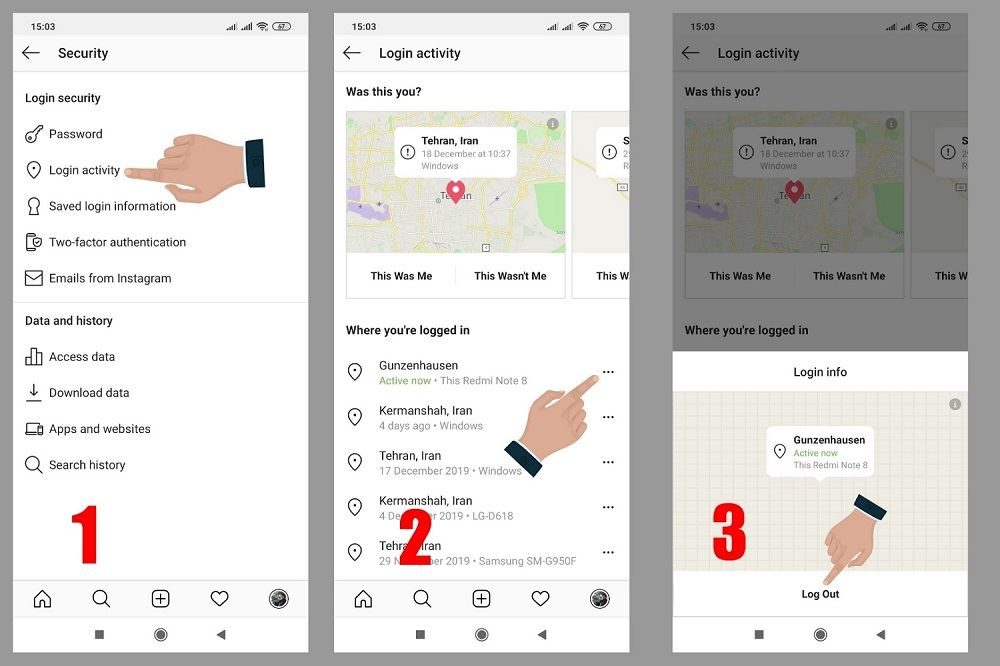
5- In the next step, select the Security option and then tap on the Login Activity option.
6- In this section, you can see all the devices with which you have logged into your account, along with the date and approximate location. To access this section faster, you can search for it using the search bar at the top of Settings.
7- To exit or remove account access from these devices, select the 3 dots button for each device and click Log out.
How to check Instagram activity login in the desktop version
Instagram users can also check the login activity through the desktop version of Instagram. This feature will be useful when the phone is lost or stolen. In such cases, the account owner should immediately cancel existing logins before someone tries to access his Instagram account.
1- Login to instagram.com and then your account via desktop.
2- Then click on the profile tab in the upper right corner.
3- Select Settings in the opened menu.
4- Choose Login Activity from here.
5- In this section, you can see all the devices with which you have entered your Instagram account, along with the date and approximate location.
6- Select the device you want to remove from your account by tapping on the downward arrow.
7- Then tap on Logout.