
به نام خدا
برای نمایش 4 ویدئو در یک پنجره در زبان پایتون، می توان تصور کرد که در هر فریم قرار است 4 تصویر در کنار یکدیگر نمایش داده شوند. در ابتدا کدی را بررسی می کنیم که چهار تصویر در یک پنجره نمایش داده می شوند.
ابتدا کتابخانه های مورد نیاز را import می کنیم.
import cv2 import numpy as np import matplotlib.pyplot as plt
سپس چهار تصویری را که می خواهیم با هم نمایش دهیم را می خوانیم و سایز تصاویر را به یک اندازه تغییر می دهیم که بتوانند در کنار یکدیگر قرار گیرند.
image1 = cv2.resize(cv2.imread('image/1.jpg'), (224,224))
image2 = cv2.resize(cv2.imread('image/2.jpg'), (224,224))
image3 = cv2.resize(cv2.imread('image/3.jpg'), (224,224))
image4 = cv2.resize(cv2.imread('image/4.jpg'), (224,224))
حال دو به دو تصاویر را در یک سطر در کنار هم قرار می دهیم. این کار را توسط دستور concatenate انجام می دهیم.
image12 = np.concatenate((image1, image2), axis=1)
image34 = np.concatenate((image3, image4), axis=1)
سپس این دو تصویر ایجاد شده را در یک ستون زیر هم قرار می دهیم.
image1234 = np.concatenate((image12,image34),axis=0)
در نهایت آن ها را توسط دستورات زیر نمایش می دهیم.
if cv2.waitKey(1) & 0xFF == ord('q'):
        cv2.destroyAllWindows()
cv2.imshow('',image1234)
# waits for user to press any key
# (this is necessary to avoid Python kernel form crashing)
cv2.waitKey(0)
# closing all open windows
cv2.destroyAllWindows()
خروجی مطابق شکل زیر است:
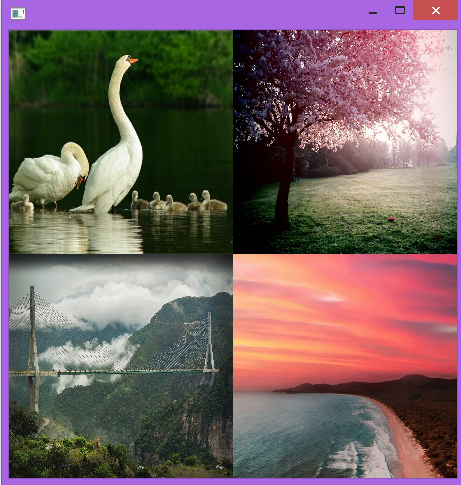
بنابراین با توجه به نمایش تصاویر، می توان فریم های چهار ویدئو را به شکل زیر نمایش داد.
import cv2
import numpy as np

file_name1 = '184.mp4'
file_name2 = '185.mp4'
file_name3 = '184.mp4'
file_name4 = '183.mp4'
vs1 = cv2.VideoCapture(file_name1)
vs2 = cv2.VideoCapture(file_name2)
vs3 = cv2.VideoCapture(file_name3)
vs4 = cv2.VideoCapture(file_name4)
while True:
    (grabbed1, frame1) = vs1.read()
    (grabbed2, frame2) = vs2.read()
    (grabbed3, frame3) = vs3.read()
    (grabbed4, frame4) = vs4.read()

    image1 = cv2.resize(frame1, (224,224))
    image2 = cv2.resize(frame2, (224,224))
    image3 = cv2.resize(frame3, (224,224))
    image4 = cv2.resize(frame4, (224,224))

    image12 = np.concatenate((image1, image2), axis=1)
    image34 = np.concatenate((image3, image4), axis=1)
    image1234 = np.concatenate((image12,image34),axis=0)

    cv2.imshow('', image1234)
    if not grabbed1 or not grabbed2 or not grabbed3 or not grabbed4:
              break
    if cv2.waitKey(1) & 0xFF == ord('q'):
        break

vs1.release()
vs2.release()
vs2.release()
vs3.release()
cv2.destroyAllWindows()