
We recommend Enabling Two Factor Authentication if you are using Instagram right now and significantly reducing the risk of hacking your account.
In this article, we are going to teach you how to enable Instagram two–factor Authentication.
You’re probably familiar with Two-Factor Authentication.
-Factor Authentication is a security feature that can significantly reduce the risk of hacking your different accounts.
Two-Factor Authentication is provided in various services, some of which include Google Accounts, WhatsApp, Telegram, and more.
When you enable Two-Factor Authentication for a particular account, Just entering the original password while trying to log in will not be enough, and you will need to verify your identity in another way you have chosen.
Therefore, the user authentication consists of two steps; hence the name of this feature is preferred Two-Factor Authentication.
Enabling Two-Factor Authentication can make it almost impossible for hackers to access users’ accounts.
When Two-Factor Authentication is enabled for your account, even if someone has access to your primary password, they won’t be able to log in and steal the information, as they may have trouble authenticating in the second step.
But in addition to the services and apps mentioned, Instagram also supports Two-Factor Authentication.
Since Instagram is where people upload and download their personal and images and video, we recommend that you enable Two-Factor Authentication.
“In this article, we are going to take a step-by-step tutorial on how to enable Instagram Two-Factor Authentication.
Enabling Instagram Two-Factor Authentication is not a complicated process at all. You’ll be able to enable this feature with just a few simple steps in the Android and iOS versions of this popular application.
If you want to enable Instagram Two-Factor Authentication, just follow these steps:
In the pop-up window that appears, touch Turn on:In this case, Instagram will send you an SMS with a specific security code. Enter the code that you received via SMS into the Instagram app.
Note that if you have not yet activated your contact number in your Instagram account, you will need to activate and confirm your contact number first.
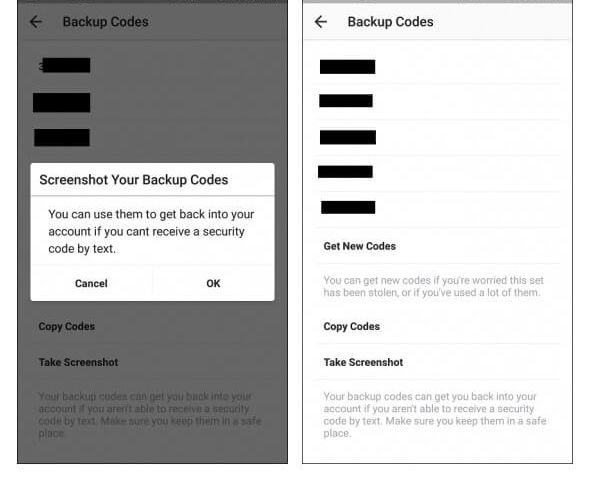
And then get the 2-step identity verification code.
then you see:
It’s just as easy to end up with Instagram’s two-step identity. From now on whenever you sign in to your Instagram account, you must go through two stages of authentication, so just not having an account password is enough.

